
Download SnapXam – AI Math Tutor, Free Solver, Step‑by‑Step Help
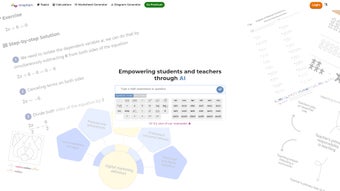
SnapXam is an AI‑driven, cross‑platform math tutor designed for learners ranging from elementary school pupils to graduate‑level researchers. The application combines a powerful neural‑network solver with an intuitive step‑by‑step explanation engine, turning a simple answer into a comprehensive learning experience. Whether you prefer typing equations, pasting LaTeX code, or snapping a photo of a handwritten problem, SnapXam’s image‑recognition module extracts the mathematical expression and delivers an accurate solution within seconds.
The platform also enriches each solution with short, curriculum‑aligned video tutorials that explain the underlying concepts, ensuring that users not only get the right answer but also understand the “why” behind it. SnapXam operates on a flexible subscription model that includes a free trial, making it accessible for individual students, teachers, and corporate training programs. With seamless cloud sync, your progress, notes, and bookmarked problems travel with you across Windows, macOS, Android, and iOS devices.
Security is a top priority: all data transfers are encrypted with TLS 1.3 and personal information is stored using end‑to‑end encryption. Regular monthly updates improve the AI models and expand the content library, keeping the tool aligned with the latest curriculum standards. In short, SnapXam offers a secure, continuously updated, and highly interactive math companion that adapts to any learning style and device, positioning itself as a modern, all‑in‑one educational solution.
Key Features, Benefits, and Pros & Cons
- AI‑Powered Solver: Handles algebra, calculus, linear algebra, differential equations, and even physics problems with instant, accurate results.
- Image Recognition: Upload handwritten notes or textbook screenshots; the AI extracts the problem and provides a detailed, step‑by‑step solution.
- Video Tutorials: Short, curriculum‑aligned videos accompany each solution, reinforcing concepts visually and audibly.
- Multi‑Level Coverage: From basic arithmetic to advanced topics such as quantum mechanics and multivariable calculus.
- Cross‑Platform Sync: Progress, notes, and favorite problems are stored in the cloud and instantly available on Windows, macOS, Android, and iOS.
- Custom Practice Sets: Generate quizzes based on specific topics, difficulty levels, or exam standards (SAT, GRE, AP).
- Secure Data Handling: End‑to‑end encryption protects all uploads and personal data; images are deleted after processing.
- Regular Updates: Monthly AI model improvements and new content libraries keep the tool current with curriculum changes.
Pros
- Highly accurate AI solver covering a vast curriculum.
- Step‑by‑step explanations turn the tool into a genuine tutor.
- Image‑recognition eliminates the need to retype handwritten problems.
- Integrated video tutorials reinforce learning visually.
- Cross‑platform cloud sync ensures continuity across devices.
- Robust encryption safeguards user privacy.
- Monthly updates improve accuracy and expand content.
- Free trial and flexible subscription plans suit both individuals and institutions.
Cons
- Full functionality requires a paid subscription; the free tier limits daily solves.
- Performance depends on a stable internet connection; no offline mode yet.
- Some advanced physics problems may need manual verification.
- Desktop installers are larger (≈150 MB) than typical utilities.
- Video tutorials can increase mobile data usage.
Installation, Usage, Compatibility & Frequently Asked Questions
Installing SnapXam is straightforward on any supported device. Desktop users on Windows 10 or later and macOS 10.14 or later can download the installer from the official website; the signed installer verifies its authenticity before installing a shortcut on the desktop. Mobile users simply search for “SnapXam AI Math Tutor” in the Google Play Store or Apple App Store and tap “Install.” After launch, creating a free account is quick—use an email address or single‑sign‑on via Google or Apple ID, then confirm via the verification email.
Once logged in, the dashboard presents a clean search bar, recent activity feed, and a prominent “Start New Problem” button. Users can input problems by typing directly, pasting LaTeX/Markdown, or tapping the camera icon to capture a handwritten equation. The AI processes the input in real time, displaying a solution pane with expandable steps. Each step includes a concise textual explanation and, where applicable, a linked video tutorial that can be played without leaving the app. Users may bookmark solutions, add personal notes, export the walkthrough as a PDF, or share it with classmates via a secure link.
SnapXam supports the following operating systems:
- Windows 10/11 (64‑bit) – Minimum 4 GB RAM, 500 MB free disk space.
- macOS 10.14 (Mojave) or later – Minimum 4 GB RAM, 500 MB free disk space.
- Android 6.0 (Marshmallow) and up – Minimum 2 GB RAM, 150 MB storage.
- iOS 12.0 and later – Minimum 2 GB RAM, 150 MB storage.
Frequently Asked Questions
Can SnapXam solve handwritten equations?
Yes. Using the built‑in camera feature on mobile or the upload button on desktop, you can snap a picture of a handwritten problem. SnapXam’s image‑recognition AI extracts the mathematical expression and generates a step‑by‑step solution.
Is there a completely free version?
SnapXam offers a free trial that allows up to five problem solves per day. Unlimited access, premium video libraries, and advanced analytics require a paid subscription, but the trial is sufficient for occasional homework help.
How does SnapXam protect my uploaded images?
All uploads are encrypted in transit (TLS 1.3) and stored temporarily on secure servers. Images are deleted automatically after processing, ensuring your personal notes are not retained longer than necessary.
Can teachers create class accounts?
Yes. SnapXam includes a “Classroom” dashboard where educators can generate invitation links, assign problem sets, and monitor student performance in real time. Bulk licensing discounts are available for schools and universities.
What if I need help with a solution that seems incorrect?
SnapXam provides a “Report Issue” button on every solution page. You can submit the problem, your concern, and optional screenshots. The support team reviews the case within 24 hours and either corrects the AI output or explains the discrepancy.
Conclusion – Why SnapXam Is Worth the Download
In a world where instant answers are abundant, SnapXam distinguishes itself by turning those answers into genuine learning moments. Its AI engine delivers accurate solutions across a staggering range of math and physics topics, while the built‑in step‑by‑step breakdown and accompanying video tutorials transform a simple calculator into a personal tutor. The seamless cross‑device experience, robust security, and regular model updates mean you can rely on SnapXam for both quick homework help and deep‑dive study sessions.
Although a subscription unlocks the full feature set, the generous free trial provides enough functionality to evaluate its value before committing. Whether you’re a high‑school student preparing for the SAT, a college engineering major wrestling with differential equations, or a teacher seeking an interactive supplement for the classroom, SnapXam offers a modern, secure, and pedagogically sound solution. Click the download button below, start your free trial, and experience a smarter way to master mathematics today.
Pros: Comprehensive coverage, AI accuracy, video explanations, cross‑platform sync.
Cons: Requires internet, limited free usage, larger installer size.






